Cloning Tanstack Query's useQuery
Content
Introduction
Using third party libraries often allows us to proceed faster in application development because we can concentrate on our business logic. However, there also are some reasons why it could be beneficial to think about how to implement things by oneself:
- Since third party libraries often have way more functionality than we would typically need, writing an own solution could decrease application size
- Learning! Implementing things by ourselves makes us understand things better.
So, when working with React, I usually use Tanstack Query for my backend queries because it simply is so nice. In this article, we're going to implement some of Tanstack Query's functionality by ourselves. Namely we're going to create simplified hooks useQuery and useMutation for querying and mutating data, respectively, and also we'll find a solution for invalidating queries, such that they are automatically refetched.
Target prototypes
Let's start by thinking about the prototypes of useQuery and useMutation. As mentioned in the introduction, we won't clone Tanstack's implementations entirely, so here is what should be enough for making it properly work:
function useQuery<T>(args: {
  queryFn: () => Promise<T>;
  queryKey: string;
}): {
  data: T | undefined;
  loading: boolean;
  error: Error | undefined;
}

function useMutation<S, T>(args: {
  mutationFn: (inputs: S) => Promise<T>;
  onSuccess: (inputs: S) => void;
  onError: (error: any) => void;
}): {
  mutate: (inputs: S) => Promise<void>;
  data: T | undefined;
  loading: boolean;
  error: Error | undefined;
}
As input for useQuery, we want to feed a query function queryFn that returns a promise for data of type T and a queryKey that lets us identify the query later on in other places. The return value should be an object containing properties for data, loading state and a potential errors. Each of these properties should be stateful, i.e. reflect the respective state of the query at any time.
useMutation will be similar: mutationFn lets us pass a async function that takes some inputs of type S (e.g. form data) and yields a promise. We also want to pass callbacks for success and error cases for the execution of mutationFn. As for useQuery, it should return an object with stateful properties for data, loading state and error - and also a function mutate, that we can use to actually trigger the mutation.
In addition, we need some globally available client for managing our queries and mutations. In specific, we want to be able to trigger refetching of queries by queryKey, so something like this is needed:
const queryClient = useQueryClient(); // this should manage global state

function someCallback(){
  queryClient.refetchQuery('some-query-key')
}
Dummy backend
For the demo application that tests our implementations, we use a dummy backend that works on the browser local storage and provides phrases. We add functions to get all phrases, get a single phrase by id and also add a new phrase.
Let's add a file api.ts where all the logic lives in:
export interface Phrase {
  id: number;
  value: string;
}

const PHRASES: Phrase[] = [
  { id: 0, value: "Hello world!" },
  { id: 1, value: "Some phrase." },
];

if (!localStorage.getItem("data")) {
  localStorage.setItem("data", JSON.stringify(PHRASES));
}

function delay(ms: number) {
  return new Promise((resolve) => setTimeout(resolve, ms));
}

export async function getPhrases(): Promise<Phrase[]> {
  await delay(1000);

  const data = localStorage.getItem("data");

  if (data) {
    return JSON.parse(data);
  } else {
    return [];
  }
}

export async function getPhrase(phraseId: number): Promise<Phrase> {
  await delay(1000);

  const data = localStorage.getItem("data");

  if (data) {
    const phrase = (JSON.parse(data) as Phrase[]).find((phrase) => phrase.id === phraseId);
    if (phrase) {
      return phrase;
    } else {
      throw new Error("No phrase with such id");
    }
  } else {
    throw new Error("Resource not found");
  }
}

export async function postPhrase(phrase: string) {
  await delay(1000);

  if (!phrase) {
    throw new Error("Phrase cannot be empty!");
  }

  const data = localStorage.getItem("data");
  if (data) {
    const phrases: Phrase[] = JSON.parse(data);
    phrases.push({ id: phrases.length, value: phrase });
    localStorage.setItem("data", JSON.stringify(phrases));

    return "success";
  }
  return "failure";
}
As you can see, when the file is executed on page load, it checks if data is available in local storage. If yes, this data is used, otherwise it is initialized with two example phrases. Since all the operations are rather fast, we add a little delay to them, in order to see the loading effect. We throw errors in case we're trying to get a phrase by id that doesn't exist or post a new phrase that is empty. All functions are async such that they return promises. In practice, we would have functions that use some client to make http requests, however, the shape will be the same: Either a promise is returned or an error is thrown.
Implementing useQuery with data, loading and error states
We start with a basic version of useQuery that basically only refactors the standard way of fetching data in React into an own hook and adds some loading and error state to it. In a file useQuery.ts, we add the following:
import { useEffect, useState } from "react";

/**
 * useQuery in basic version, fetching only occurs once
 */
export default function useQuery<T>(args: {
  queryFn: () => Promise<T>;
  queryKey: string;
}) {
  const [data, setData] = useState<T>();
  const [loading, setLoading] = useState(false);
  const [error, setError] = useState<Error>();

  useEffect(() => {
    (async () => {
      setLoading(true);

      try {
        const data = await args.queryFn();
        setData(data);
      } catch (error) {
        setError(error as Error);
      }

      setLoading(false);
    })();
  }, []);
  return { data, loading, error };
}
All three data, loading state and error are managed in local states with appropriate initial values. Then an effect is executed using useEffect, setting the loading state to true and then trying to get the data by calling the query function. If this succeeds, the data state gets updated, otherwise the error state. When done with that, the loading state gets set back to false.
As you can see with the highlighted line, the effect's dependency array is empty, hence, the effect only gets triggered exactly once (ok, twice if in development mode with StrictMode enabled 😁).
We will now utilize the second argument queryKey to make the hook more dynamic. Our query key will be of type string and is going to have values like "phrases", to identify a query that delivers all available phrases. But we will also set it to values like phrase-${phraseId}, where phraseId could be some stateful value itself.
By adding queryKey to the dependency list of our effect, fetching will be triggered again if the key changes:
import { useContext, useEffect, useState } from "react";
import { QueryContext, QueryKey } from "./QueryContext";

export default function useQuery<T>(args: {
  queryFn: () => Promise<T>;
  queryKey: string;
}) {
  const [data, setData] = useState<T>();
  const [loading, setLoading] = useState(false);
  const [error, setError] = useState<Error>();

  useEffect(() => {
    (async () => {
      setData(undefined);      setError(undefined);      setLoading(true);

      try {
        const data = await args.queryFn();
        setData(data);
      } catch (error) {
        setError(error as Error);
      }

      setLoading(false);
    })();
  }, [args.queryKey]);
  return { data, loading, error };
}
Note that we also have to reset data and error state to their initial values before fetching the data.
Demo application setup
It's time to test what we built so far. A typical use case in practice would be to have a page that loads detail information about some entity. This page would be dynamically created using the id of that entity for example, which could itself be provided by a dynamic route segment, so, something like /phrases/{phrase-id} in our case of phrases.
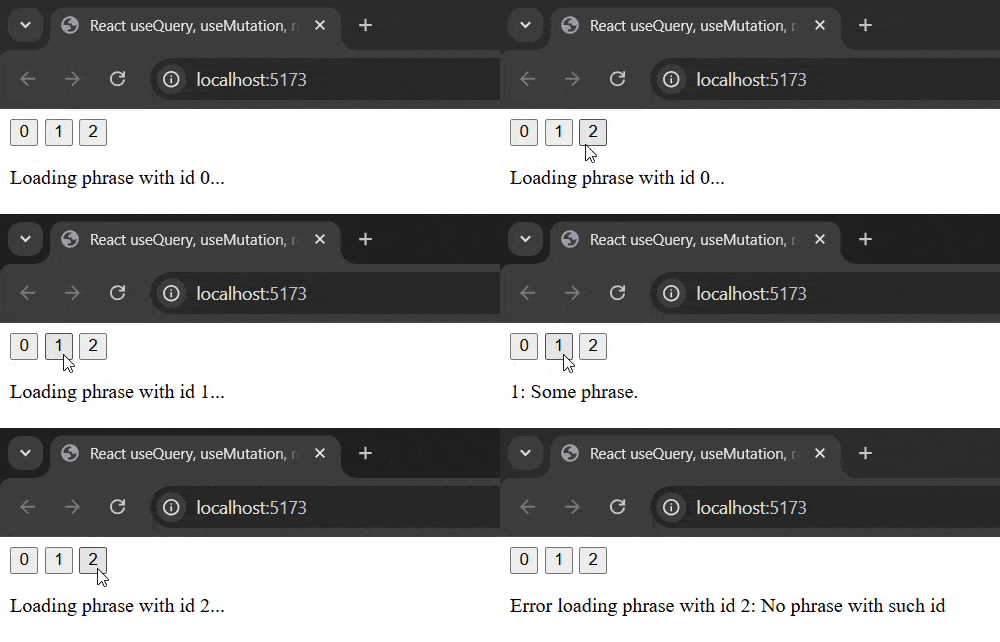
Since we don't want to set up routing in the demo application, we'll mock that behavior by adding buttons, by which we update a local phraseId state. phraseId is used in the query's key, so data should be updated if phraseId changes. Here's the content of App.tsx:
import { useState } from "react";
import useQuery from "./useQuery";
import { getPhrase } from "./api";

function App() {
  const [phraseId, setPhraseId] = useState(0);

  const { data: phrase, loading, error } = useQuery({
    queryFn: () => getPhrase(phraseId),
    queryKey: `phrase-${phraseId}`,
  });

  return (
    <>
      <div style={{ display: "flex", gap: 5 }}>
        <button onClick={() => setPhraseId(0)}>0</button>
        <button onClick={() => setPhraseId(1)}>1</button>
        <button onClick={() => setPhraseId(2)}>2</button>
      </div>
      {loading && <p>Loading phrase with id {phraseId}...</p>}
      {error && <p>Error loading phrase with id {phraseId}: {errorPhrase.message}</p>}
      {phrase && <p>{phrase.id}: {phrase.value}</p>}
    </>
  );
}
export default App;
The result should look like the following:
Adding refetching capability with a query context
So far we have a wrapper for queries that can be parametrized by providing a potentially stateful query key - the query then re-executes if this query key changes. Something similar can be done to add capability for refetching due to data invalidation, i.e. if the user added data to the application and affected parts now need to be synchronized.
The solution will be to add another dependency to the effect in useQuery. We will simply use a number, think of it as a version of the query, that we change by increasing, if things should be refetched. However, this dependency should be globally managed state such that we can use it in any place of our applicaion where that state is available. For example, we could have a dialog that triggers some action, say, delete something. In another place in the app, we have a query that should be updated if the deletion succeeds. We now want to notify that query to do so, but from inside the dialog, which potentially has no direct connection to the other component.
That is, we need global state and whenever (not too complicated) global state is required, the built-in useContext hook is your friend. Let's add a new file QueryContext.ts to our application, where we create a context and its default state:
import { createContext } from "react";

interface IQueryContext {
  addQueryState: (queryKey: string) => void;
  getQueryState: (queryKey: string) => number | undefined;
  refetchQuery: (queryKey: string) => void;
}

export const QueryContext = createContext<IQueryContext>({
  addQueryState: () => {},
  getQueryState: () => 0,
  refetchQuery: () => {},
});
So, these are the things that our context should expose:
- A function
addQueryStateto add a new query to the context should keep track of - A function
getQueryStateto get the current state, the version - A function
refetchQuerythat triggers a update of the query state
Next, we add a provider component for the context, QueryProvider.tsx, where we put the actual implementation of the things above:
import { PropsWithChildren, useState } from "react";
import {  QueryContext } from "./QueryContext";

export default function QueryProvider(props: PropsWithChildren) {
  const [queryStates, setQueryStates] = useState<Map<string, number>>(new Map());

  function addQueryState(queryKey: string) {
    setQueryStates((states) => new Map(states).set(queryKey, 1));
  }

  function refetchQuery(queryKey: string) {
    setQueryStates((states) => {
      const queryState = states.get(queryKey);

      if (queryState) {
        return new Map(states).set(queryKey, queryState + 1);
      } else {
        return states;
      }
    });
  }

  function getQueryState(queryKey: string) {
    return queryStates.get(queryKey);
  }

  return (
    <QueryContext.Provider
      value={{ addQueryState, refetchQuery, getQueryState }}
    >
      {props.children}
    </QueryContext.Provider>
  );
}
As internal state, we use a standard Map with string keys and number values. Now, addQueryState simply sets an item in the map, getQueryState returns it and refetchQuery increases the value of it, if existent.
We provide the context by wrapping our app component with the provider componenent, so in main.tsx:
import { StrictMode } from "react";
import { createRoot } from "react-dom/client";
import App from "./App.tsx";
import QueryProvider from "./QueryProvider.tsx";

createRoot(document.getElementById("root")!).render(
  <StrictMode>
    <QueryProvider>
      <App />
    </QueryProvider>
  </StrictMode>
);
Adding the query state to useQuery
Now that the context is ready, we can use it in useQuery.ts:
import { useContext, useEffect, useState } from "react";
import { QueryContext } from "./QueryContext";

export default function useQuery<T>(args: {
  queryFn: () => Promise<T>;
  queryKey: string;
}) {
  const [data, setData] = useState<T>();
  const [loading, setLoading] = useState(false);
  const [error, setError] = useState<Error>();

  const queryContext = useContext(QueryContext);  useEffect(() => {    queryContext.addQueryState(args.queryKey);  }, [args.queryKey]);  const queryState = queryContext.getQueryState(args.queryKey);
  useEffect(() => {
    queryState &&      (async () => {
        setData(undefined);
        setError(undefined);
        setLoading(true);

        try {
          const data = await args.queryFn();
          setData(data);
        } catch (error) {
          setError(error as Error);
        }

        setLoading(false);
      })();
  }, [queryState, args.queryKey]);
  return { data, loading, error };
}
First, we call useContext to get the context. Then, with another effect, we add the query to the context. This effect should be re-executed if the query key changes, so we add args.queryKey to the list of dependencies. Next, we get that same query state again from the context and store it in a constant queryState. In the main data-fetching effect, we add the new queryState to the dependencies. However, we have to keep in mind, that this state will only be available, i.e. non-undefined, in the next render cylce, so we conditionally execute the data fetching, to prevent it from being executed twice. And that should be it for our version of useQuery.
useMutation
Before adding code to the template to test the refetching, let's add useMutation in a new useMutation.ts file. The code is basically the same as for useQuery with the difference, that fetching now doesn't happen in useEffect but in a function mutate, that is then exposed by the hook. Also, the additional success and error callbacks are called at appropriate places and lastly, we will omit any kind of mutationKey because we don't want the mutation to be automatically re-executed because something changed somewhere:
import { useState } from "react";

export default function useMutation<S, T>(args: {
  mutationFn: (inputs: S) => Promise<T>;
  onSuccess: (inputs: S) => void;
  onError: (error: any) => void;
}) {
  const [data, setData] = useState<T>();
  const [loading, setLoading] = useState(false);
  const [error, setError] = useState<Error>();

  async function mutate(inputs: S) {
    setData(undefined);
    setError(undefined);
    setLoading(true);

    try {
      const data = await args.mutationFn(inputs);
      setData(data);
      args.onSuccess(inputs);    } catch (error) {
      setError(error as Error);
      args.onError(error);    }
    setLoading(false);
  }

  return { mutate, data, loading, error };
}
Keep in mind, that we still have to reset data and error state to initial values in the beginning, because of course, mutate could be called multiple times.
Testing everything
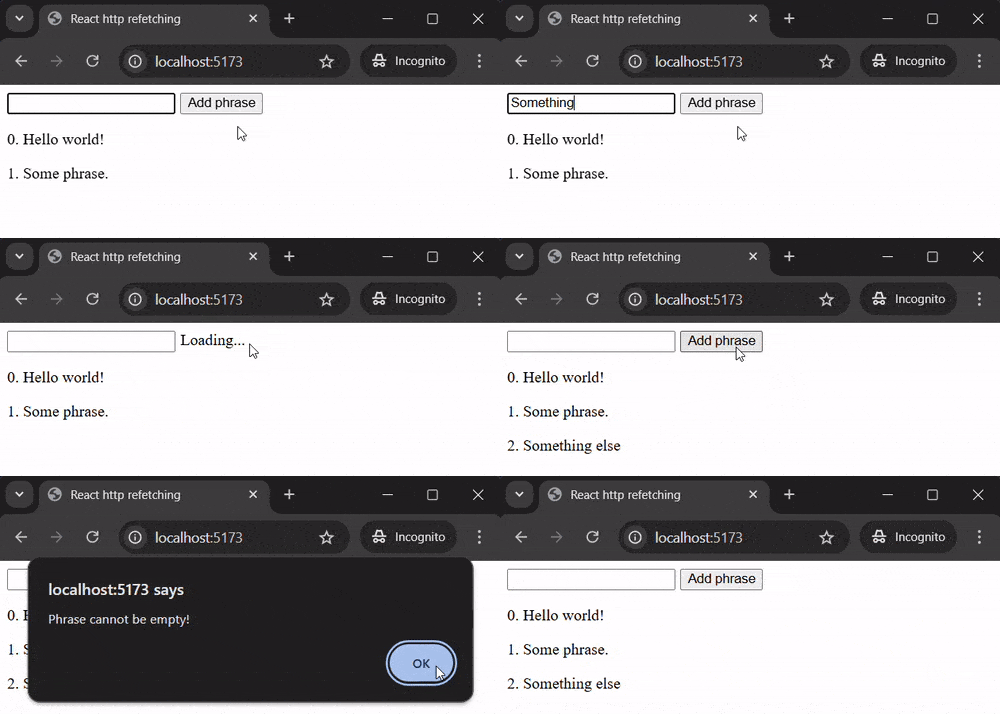
We now adjust our demo application from the beginning by letting the query get all phrases, which are then rendered as a list. Furthermore, we add a mutation that lets us add new phrases. In the success callback, we will refetch the phrases, such that the newly added phrase is appended to the list. In case of an error, we alert the error to the user and do nothing else. The data for a new phrase comes from an input, whose value is submitted to mutate by means of a button click.
import { useContext, useRef } from "react";
import useQuery from "./useQuery";
import { QueryContext } from "./QueryContext";
import { getPhrases, postPhrase } from "./api";
import useMutation from "./useMutation";

function App() {
  const queryContext = useContext(QueryContext);

  const {
    data: phrases,
    loading,
    error,
  } = useQuery({
    queryFn: getPhrases,
    queryKey: "phrases",
  });

  const { mutate, loading: loadingMutation } = useMutation({
    mutationFn: (phrase: string) => postPhrase(phrase),
    onSuccess: () => {
      queryContext.refetchQuery("phrases");
    },
    onError: (e) => {
      const error = e as Error;
      window.alert(error.message);
    },
  });

  const inputRef = useRef<HTMLInputElement>(null);

  function handleAddPhrase() {
    mutate(inputRef.current!.value);
    inputRef.current!.value = "";
  }

  return (
    <>
      <div style={{ display: "flex", gap: 5 }}>
        <input ref={inputRef} />
        {loadingMutation ? (
          <span>Loading...</span>
        ) : (
          <button onClick={handleAddPhrase}>Add phrase</button>
        )}
      </div>
      {loading && <p>Loading phrases...</p>}
      {error && (
        <p>Error loading phrases: {error.message}</p>
      )}
      <div>
        {phrases?.map((phrase) => (
          <p key={phrase.id}>
            {phrase.id}. {phrase.value}
          </p>
        ))}
      </div>
    </>
  );
}

export default App;
Here is what the application should look like:
Note
We used string for queryKey and number for queryState. Of course, these can be replaced by more complicated objects - for example, Tanstack Query uses arrays like ["phrase", phraseId] as keys. In such cases, one must ensure that involved useEffects aren't infinitely triggered, because technically, even though the content values of such an array don't necessarily change, the array itself would be newly created in each render cycle.
If all the array's items themselves were primitive values, the solution could be to memoize the key and only recompute it, if some dependency changed:
import { useMemo } from "react";
...
const queryKey = useMemo(() => args.queryKey, [...args.queryKey])

useEffect(() => {
  // do something
}, [queryKey]);
Alternatively, the spread operator could directly be used inside the dependency array:
useEffect(() => {
  // do something
}, [...args.queryKey]);
Another option would be to stringify the key, what perhaps would even be the best solution, because array items don't need to be of primitive type then:
const queryKey = JSON.stringify(args.queryKey);

useEffect(() => {
  // do something
}, [queryKey]);
Resources
