A query service for Angular that handles refetching
Content
Introduction
When I was building my first own web application with decoupled front- and backend, I wondered how to keep UI and backend in sync. I started to set up some UI state, that should reflect the backend state, but soon I found out that I was practically duplicating the logic.
I thought it would be best if whenever something in the backend changes due to some action in the frontend, the affected parts in the frontend should simply be re-evaluated with newly fetched data. Back then, I was working with React and came across Tanstack Query, what does exactly the thing I was looking for.
So, in this article, we're going to build something similar to Tanstack Query's way of refetching queries - but for Angular, and of course, with much more limited functionality.
Outlining the solution
Let's first think about what our solution should look like. As Angular thinks of shared logic in services, we should implement a service - say, a query service - that we can inject in our component.
With the service injected, we want to be able to use it following way:
import { inject } from '@angular/core';
import { QueryService } from './query.service';
...
queryService = inject(QueryService);

data$ = this.queryService.query({
  queryObs: () => getSomeData(),
  queryKey: 'some-key',
});

someHandler(){
  // do something in handler, like submitting a form
  this.queryService.refetchQuery('some-key');
}
So, in the first place, QueryService should enable us to construct queries based on some querying function queryObs and a key queryKey. Additionally, QueryService should expose a method refetchQuery that allows us to trigger a re-fetching of some query from anywhere in our application. If you are used to Tanstack Query, this probably looks familiar to you.
The demo project setup
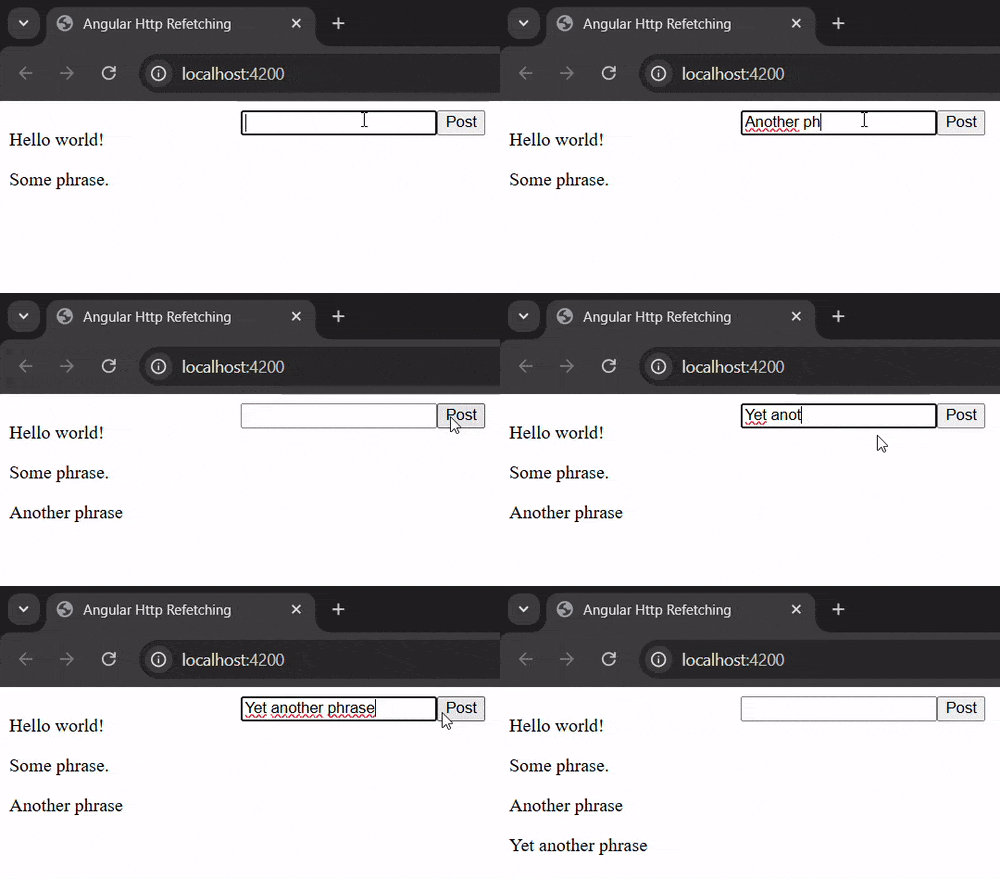
Before starting to code our service, let's talk about the surrouding demo application. The idea is to simply render a list of phrases on screen that is hypothetically fetched from some backend, and provide an input and button to add new phrases to that list, where the latter represents a post call to that backend.
Since we don't want to set up a real backend for this, we're going to implement a fake backend, that uses the browser's localStorage as data storage location. We could also use memory as data storage, however, using localStorage can make the data survive page reloads, what gives us a more realistic feeling about the backend.
In a new file api.ts, we add a model and some initial values for the data:
export interface Phrase {
  id: number;
  value: string;
}

const PHRASES: Phrase[] = [
  { id: 0, value: 'Hello world!' },
  { id: 1, value: 'Some phrase.' },
];
When loading the page, we check if there already is an item with key "data" in the local storage. If yes, we'll use that data, otherwise we set the item with "data" key to our initial data, stringifying everything:
if (!localStorage.getItem('data')) {
  localStorage.setItem('data', JSON.stringify(PHRASES));
}
Next, we add methods for getting all phrases and for adding a new phrase.
As these would be async http calls in a realistic application, we also add some async behavior to them by letting them return observables, just as Angular's built-in HttpClient would also do:
import { Observable, of } from 'rxjs';
...
export function getPhrases(): Observable<Phrase[]> {
  const data = localStorage.getItem('data');
  if (data) {
    return of(JSON.parse(data));
  }
  return of([]);
}

export function postPhrase(phrase: string) {
  const data = localStorage.getItem('data');
  if (data) {
    const phrases: Phrase[] = JSON.parse(data);
    phrases.push({id: phrases.length, value: phrase});
    localStorage.setItem('data', JSON.stringify(phrases));
  }
  return of('success');
}
Implementing the query service
With a dummy backend at hand, let's start coding the query service. We add a new file query.service.ts and add the following, initial content:
import { Injectable } from '@angular/core';
import { Observable, switchMap } from 'rxjs';

@Injectable({
  providedIn: 'root',
})
export class QueryService {
  query<T>(args: {
    queryObs: () => Observable<T>;
  }) {
    return args.queryObs();
  }
}
Remember that our backend calls, and also realistic calls using HttpClient, only emit one value (at most, if not erroring) and then complete. So, we have to adjust queryObs() somehow, such that it emits further values, whenever we decide so, i.e. by calling the (still to be added) refetchQuery function from the beginning.
Whenever we as a user want to decide when some stream should emit a new value, we should consider using Subject or BehaviorSubject from the RxJS library. Both are special types of Observable and have a method next that can be called to emit a new value to their stream. BehaviorSubject needs an initial value, that is immediately emitted if someone subscribes to its stream, whereas Subject doesn't have an initial value and any subscriber's data stream will start with the next invocation of next.
Our infinite stream of data should start with such a subject. And whenever this subject emits a new value, data fetching should be re-triggered.
Since we want our data fetching to start immediately on page load, we need a starting value for our subject's stream, so we are going to use BehaviorSubject.
We adjust our code:
import { Injectable } from '@angular/core';
import { BehaviorSubject, Observable, switchMap } from 'rxjs';

@Injectable({
  providedIn: 'root',
})
export class QueryService {
  subject = new BehaviorSubject(null);

  query<T>(args: { queryObs: () => Observable<T> }) {
    return this.subject.pipe(      switchMap(() => args.queryObs())    );  }
}
As you can see, our data stream now starts with a BehaviorSubject and then switches to the actual data observable. Note that we're using value of null in the subject, because we're more interested in the fact that a new value was emitted than in the value itself. That is, the value can be chosen arbitrarily.
We could now use subject in our main component and trigger a re-fetching by calling subject.next(null). However, I want to make the service a little more generic, especially, I want to allow more than one query and thus more than one subject must be managed in the service.
Let's add a private Map of subjects, create the subject inside of the query, and add it to the map with a key provided by the user. Finally, we add a method to trigger the emission of the next value for a subject given by key:
import { Injectable } from '@angular/core';
import { BehaviorSubject, Observable, switchMap } from 'rxjs';

@Injectable({
  providedIn: 'root',
})
export class QueryService {
  private querySubjects = new Map<string, BehaviorSubject<null>>();
  query<T>(args: {
    queryObs: () => Observable<T>,
    queryKey: string,  }) {
    const subject = new BehaviorSubject(null);    this.querySubjects.set(args.queryKey, subject);    return subject.pipe(
      switchMap(() => args.queryObs())
    );
  }
  refetchQuery(queryKey: string) {    this.querySubjects.get(queryKey)?.next(null);  }}
Et voilà! That's it. We can now test the service in our demo application.
Testing the query service
First, we inject the query service into our component and create a query with key "phrases" using the dummy backend we implemented earlier:
import { Component, inject } from '@angular/core';
import { QueryService } from './query.service';
import { Phrase, getPhrases } from './api';
import { AsyncPipe } from '@angular/common';

@Component({
  selector: 'app-root',
  imports: [AsyncPipe],
  templateUrl: './app.component.html',
})
export class AppComponent {
  queryService = inject(QueryService);     data$ = this.queryService.query<Phrase[]>({    queryObs: () => getPhrases(),    queryKey: 'phrases',  });}
Then, we add a handler for adding a new phrase, that we can bind to a button later on. In the handler, we call postPhrase and subscribe to its stream. When the stream successfully completes, we fire a callback that triggers the re-fetching of the query with key "phrases" and then resets the input:
import { Component, inject } from '@angular/core';
import { QueryService } from './query.service';
import { getPhrases, postPhrase, Phrase } from './api';
import { AsyncPipe } from '@angular/common';

@Component({
  selector: 'app-root',
  imports: [AsyncPipe],
  templateUrl: './app.component.html',
})
export class AppComponent {
  queryService = inject(QueryService);

  data$ = this.queryService.query<Phrase[]>({
    queryObs: () => getPhrases(),
    queryKey: 'phrases',
  });

  addPhrase(input: HTMLInputElement) {    postPhrase(input.value).subscribe({      complete: () => {        this.queryService.refetchQuery('phrases');        input.value = "";      },    });  }}
In the template, we display the list of phrases on the left and an input plus button on the right. The handler from above gets bound to the button:
<div style="display: flex">
  <div style="width: 200px; ">
    @if (data$ | async; as phrases) {
      @for (phrase of phrases; track phrase.id) {
        <p>{{phrase.value}}</p>
      }
    }
  </div>
  <div>
    <input #input />
    <button (click)="addPhrase(input)">Post</button>
  </div>
</div>
The result looks like this:
Improvements
Of course, this is just a very basic implementation with lots of things that can be improved. For example, we neither have loading state information nor error handling. In addition, the required shape of the backend calls is very limited, that is, such calls could themselves depend on some other input parameters, that could even be emitted by an observable!
I have two other articles, where I present generic wrappers for querying and mutating http calls. Feel free to check them out or even combine them with the refetching logic from this article.
Resources
