A generic http fetching wrapper for Angular using RxJS
Content
- Introduction
- A dummy http request
- A simple starting case
- Testing the simple case
- The parametrized case
- Testing the parametrized wrapper
- Further improvements
Introduction
While doing research for my first Angular project, I came across a lot of articles in the web, describing ways to implement a wrapper for managing the state of http requests, i.e. if a request is loading, has encountered some error or did resolve to the actual, requested data. Unfortunately, none of these approaches met my requirements on such a wrapper, so I implemented one by myself, that I will present to you in this article. Let's start with the requirements I had.
As input, it should receive an observable, that emits some parameters that are then used to construct the observable that eventually emits the requested data. For example, such parameters could be dynamic route segments or query params, like the specific page of results, that is passed to the data fetching.
The output should be three observables/observable-like objects for each loading, error and data state that can be subscribed to independently, where only one of these observables should emit a truthy value at a time.
To talk in code, here is what the wrapper function signature should roughly look like:
query<S, T>(args: {
  paramsObs: Observable<S>,
  httpObsFn: (S) => Observable<T>
  // ... maybe some other params
}): {
    data$: ObservableLike<T>; // fictitious type for now
    loading$: ObservableLike<...>;
    error$: ObservableLike<...>;
};
In a template, the returned observables should be usable in the usual way of using the
asyncpipe, like this:@if( loading$ | async ) { <p>Loading...</p> } @if ( error$ | async) { <p>Error</p> } @if ( data$ | async ){ <p>Data</p> }As mentioned above, these states should be exclusively truthy, that is, only one block should be displayed at each time. Of course, this behavior could also be achieved by using
if elseorswitchstatements. In the latter approach however, one is bound to the structure of such statements, whereas in my approach, the three blocks can be used in any order and desired structure.A dummy http request
In Angular, one would typically use the built-in http client to make API calls:
import { inject } from '@angular/core';
import { HttpClient } from '@angular/common/http';
...
http = inject(HttpClient);
data = http.get<DataType>('/path/to/some/resource')
We will use the following fake http call function and data to later on test our wrapper function:
import { HttpErrorResponse } from "@angular/common/http";
import { delay, map, of } from "rxjs";

const DUMMY_DATA = [
  "Hello world",
  "Something",
  "Something else",
  "Still something else",
  "Yet another string",
];

// Mocks an http function:
function fakeQueryFn(args: {
  index: number;
  letItFail: boolean;
  delay: number;
}) {
  return of(this.DUMMY_DATA[args.index]).pipe(
    delay(args.delay),
    map((value) => {
      if (args.letItFail) {
        throw new HttpErrorResponse({
          error: new Error("Failed by construction, hehe!"),
        });
      } else {
        return value;
      }
    })
  );
}
The function has a parameter
indexand will return theindex-th element ofDUMMY_DATAas observable, unless we specifyletItFail = true. In that case, the request artificially fails and throws anHttpErrorResponse, just as the built-in AngularHttpClientwould do in case of an error. Bydelay, we can add some milliseconds of delay to the function such that we can better see the loading state.A simple starting case
Now, let's start to implement the wrapper function. As a start, we will assume that there are no parameters that the querying function depends on, i.e. the wrapper has the following shape:
query<T>(args: { httpObs: Observable<T> }) {
  const loading$ = ...
  const error$ = ...
  const data$ = ...

  return { data$, loading$, error$ };
}
If
httpObsemits successfully, its data should be emitted bydata$, so it makes sense to usehttpObsas a starting point fordata$. Since we want to emit potential errors in our second streamerror$, we need to catch errors that might occur in thehttpObsstream:import { catchError } from 'rxjs'; ... query<T>(args: { httpObs: Observable<T> }) { const loading$ = ... const error$ = ... const data$ = args.httpObs.pipe( catchError((error: HttpErrorResponse) => { // emit error in error$ // return something }), ); return { data$, loading$, error$ }; }This is the perfect use case for RxJs's
BehaviorSubject. ABehaviorSubjectis a special form of observable that takes some initial value, and whenever someone subscribes to its stream, the current value will be emitted.BehaviorSubjects have anextmethod that will trigger the emission of the next value. We use it like this:import { BehaviorSubject, catchError, of } from 'rxjs'; ... query<T>(args: { httpObs: Observable<T> }) { const loading$ = ... const error$ = new BehaviorSubject<null | HttpErrorResponse>(null); const data$ = args.httpObs.pipe( catchError((error: HttpErrorResponse) => { error$.next(error); return of(null); }), ); return { data$, loading$, error$ }; }We have to keeep in mind, that
catchErrorstill has to either return some new observable, or throw an error, so we return an observable that just emitsnull. In case of an error, a value ofnullwill now be emitted todata$, what perfect for our purpose.For the loading state, we will do something similar:
import { BehaviorSubject, catchError, of, tap } from 'rxjs';
...
query<T>(args: { httpObs: Observable<T> }) {
  const loading$ = new BehaviorSubject(true);  const error$ = new BehaviorSubject<HttpErrorResponse | null>(null);

  const data$ = args.httpObs.pipe(
    catchError((error: HttpErrorResponse) => {
      error$.next(error);
      return of(null);
    }),
    tap(() => loading$.next(false))  );

  return { data$, loading$, error$ };
}
As you can see,
loading$is set to aBehaviorSubjectwith an initial value oftrue. This reflects the fact, that in the beginning of the fetching process, the state should be loading. We now only have to emit the next value offalseat the proper point of time.tapis a function that can be used inpipeto do some side effect and pass the previous data forward as it is.Testing the simple case
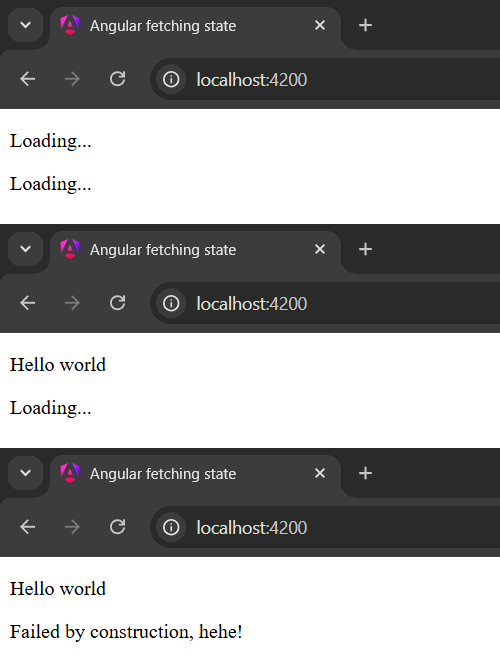
With that, the first version of our wrapper is finished, so now, let's test it in a component with use of our fake http function. We create two queries, one that succeeds and one that fails, in both cases the underlying query function should simply return the first element from our
DUMMY_DATA:fakeQuery = this.query({ httpObs: this.fakeQueryFn({ index: 0, letItFail: false, delay: 1000 }), }); failingFakeQuery = this.query({ httpObs: this.fakeQueryFn({ index: 0, letItFail: true, delay: 2000 }), });And in the component template:
@if (fakeQuery.data$ | async; as data) {
<p>{{data}}</p>
} @if (fakeQuery.loading$ | async) {
<p>Loading...</p>
} @if (fakeQuery.error$ | async; as error) {
<p>{{error.error.message}}</p>
} @if (failingFakeQuery.data$ | async; as data) {
<p>{{data}}</p>
} @if (failingFakeQuery.loading$ | async) {
<p>Loading...</p>
} @if (failingFakeQuery.error$ | async; as error) {
<p>{{error.error.message}}</p>
}
The result should be the following:
The parametrized case
Let's move on to the more complicated case, where the source observable depends on some parameters that might themselves be emitted by some observable. Besides of the argument added for the parameters observable, the general shape stays like it was. Please note that the type of data emitted by the parameters observable is supposed to be exactly the same as needed as input for the actual fetching observable:
import { HttpErrorResponse } from '@angular/common/http';
import { BehaviorSubject, Observable } from 'rxjs';
...
parametrizedQuery<S, T>(args: {
  paramsObs: Observable<S>;  httpObsFn: (params: S) => Observable<T>;
}) {
  const loading$ = new BehaviorSubject(true);
  const error$ = new BehaviorSubject<HttpErrorResponse | null>(null);

  let data$: Observable<T | null>;
  data$ = ...

  return { data$, loading$, error$ };
}
Since new data should be fetched each time new parameters are emitted, our data stream should now start with the parameters observable. We then use
switchMapto switch to the actual http observable in the subsequent pipe:import { HttpErrorResponse } from '@angular/common/http'; import { BehaviorSubject, Observable, switchMap } from 'rxjs'; ... parametrizedQuery<S, T>(args: { paramsObs: Observable<S>; httpObsFn: (params: S) => Observable<T>; }) { const loading$ = new BehaviorSubject(true); const error$ = new BehaviorSubject<HttpErrorResponse | null>(null); let data$: Observable<T | null>; data$ = args.paramsObs.pipe( switchMap((params) => args.httpObsFn(params)), ); return { data$, loading$, error$ }; }Next, we can add back our error handling:
import { HttpErrorResponse } from '@angular/common/http';
import { BehaviorSubject, Observable, switchMap, catchError, of } from 'rxjs';
...
parametrizedQuery<S, T>(args: {
  paramsObs: Observable<S>;
  httpObsFn: (params: S) => Observable<T>;
}) {
  const loading$ = new BehaviorSubject(true);
  const error$ = new BehaviorSubject<HttpErrorResponse | null>(null);

  let data$: Observable<T | null>;
  data$ = args.paramsObs.pipe(
    switchMap((params) => args.httpObsFn(params).pipe(      catchError((error: HttpErrorResponse) => {        error$.next(error);        return of(null);      })    )),  );

  return { data$, loading$, error$ };
}
Note that we have to add the error handling to an inner pipe on
httpObsFn(params)to keep our stream alive. If we would use it outside, next toswitchMap, the stream would, in case of an error, continue withof(null)which only emitsnullonce, then terminates and is unsubscribed.Let's add the loading state logic like we did in the first case:
import { HttpErrorResponse } from '@angular/common/http';
import { BehaviorSubject, Observable, switchMap, catchError, of, tap } from 'rxjs';
...
parametrizedQuery<S, T>(args: {
  paramsObs: Observable<S>;
  httpObsFn: (params: S) => Observable<T>;
}) {
  const loading$ = new BehaviorSubject(true);
  const error$ = new BehaviorSubject<HttpErrorResponse | null>(null);

  let data$: Observable<T | null>;
  data$ = args.paramsObs.pipe(
    switchMap((params) => args.httpObsFn(params).pipe(
      catchError((error: HttpErrorResponse) => {
        error$.next(error);
        return of(null);
      })
    )),
    tap(() => loading$.next(false)),
  );

  return { data$, loading$, error$ };
}
The solution is fine so far, but it doesn't work the way we want it to work. The problems are:
data$doesn't re-emit an initialnullif new parameters are emitted byparamsObs- Similarly,
loading$isn't set back totrueif new parameters are emitted - And again,
error$isn't reset tonullif parameters change
We can make
data$switch back tonullby letting the http query observable always start withnull. As forloading$anderror$, we can simply emit the respective values at the beginning of the pipe:import { HttpErrorResponse } from '@angular/common/http'; import { BehaviorSubject, Observable, switchMap, catchError, of, tap, startWith } from 'rxjs'; ... parametrizedQuery<S, T>(args: { paramsObs: Observable<S>; httpObsFn: (params: S) => Observable<T>; }) { const loading$ = new BehaviorSubject(true); const error$ = new BehaviorSubject<HttpErrorResponse | null>(null); let data$: Observable<T | null>; data$ = args.paramsObs.pipe( tap(() => { error$.next(null); loading$.next(true); }), switchMap((params) => args.httpObsFn(params).pipe( startWith(null), catchError((error: HttpErrorResponse) => { error$.next(error); return of(null); }) )), tap(() => loading$.next(false)), ); return { data$, loading$, error$ }; }There is one additional problem though: By letting
httpObsFn(params)always start withnull, we're emitting the finalfalsetoloading$too early. We can fix that by analyzing the reason whynullwas emitted:If
nullwas emitted because of the data being (still or again)null,loading$should betrue. If it was set tonullbecause of the error handling,loading$should emitfalse. This means, that we cannot returnnullfrom the error handling. We will pass the error itself instead (even though any truthy and identifiable object would also work) and add the following checks in a subsequentmapoperator:import { HttpErrorResponse } from '@angular/common/http'; import { BehaviorSubject, Observable, switchMap, catchError, of, tap, startWith, map } from 'rxjs'; ... parametrizedQuery<S, T>(args: { paramsObs: Observable<S>; httpObsFn: (params: S) => Observable<T>; }) { const loading$ = new BehaviorSubject(true); const error$ = new BehaviorSubject<HttpErrorResponse | null>(null); let data$: Observable<T | null>; data$ = args.paramsObs.pipe( tap(() => { error$.next(null); loading$.next(true); }), switchMap((params) => args.httpObsFn(params).pipe( startWith(null), catchError((error: HttpErrorResponse) => { error$.next(error); return of(null); }), )), map((value) => { // Set loading to false if either data is there or error occurred and // return null in case of error, data otherwise: if (value) { loading$.next(false); if (value instanceof HttpErrorResponse) { return null; } else { return value; } } // If data is not there yet, return null: return null; }) ); return { data$, loading$, error$ }; }Testing the parametrized wrapper
And that should be it! Let's now test it with our fake http function. The goal is to render a random item taken from
DUMMY_DATA, every time some button is clicked. We achieve this by updating query params in our url when hitting the button. So, in the component, we add a handlernavigatefor the button click event:import { Router } from '@angular/router'; ... router = inject(Router); // This updates the url to /?index={some-number} navigate() { this.router.navigate([], { queryParams: { index: Math.floor(Math.random() * this.DUMMY_DATA.length), }, }); }Now we need an observable that emits the query params of the loaded route. For that, we use Angular's injectable service
ActivatedRoutewhich provides aqueryParamMapobservable, that emits aMapof all query params in the activated route. Therefore, we have to map the source observable to our desired shape by extracting theindexquery param from the map and casting it to Number. Note that, ifindexquery param is not defined,Number(null)will evaluate to0. Finally, we can construct our query:import { ActivatedRoute } from '@angular/router'; ... route = inject(ActivatedRoute); paramsObs = this.route.queryParamMap.pipe( map((queryParams) => Number(queryParams.get('index'))) ); fakeParametrizedQuery = this.parametrizedQuery({ paramsObs: this.paramsObs, httpObsFn: (index) => this.fakeQueryFn({ index, letItFail: false, delay: 1000 }), });In the template, we write the following:
<button (click)="navigate()">Navigate</button>

@if (fakeParametrizedQuery.data$ | async; as data) {
<p>{{data}}</p>
} @if (fakeParametrizedQuery.loading$ | async) {
<p>Loading...</p>
} @if (fakeParametrizedQuery.error$ | async) {
<p>Error again...</p>
}
The result should look like this
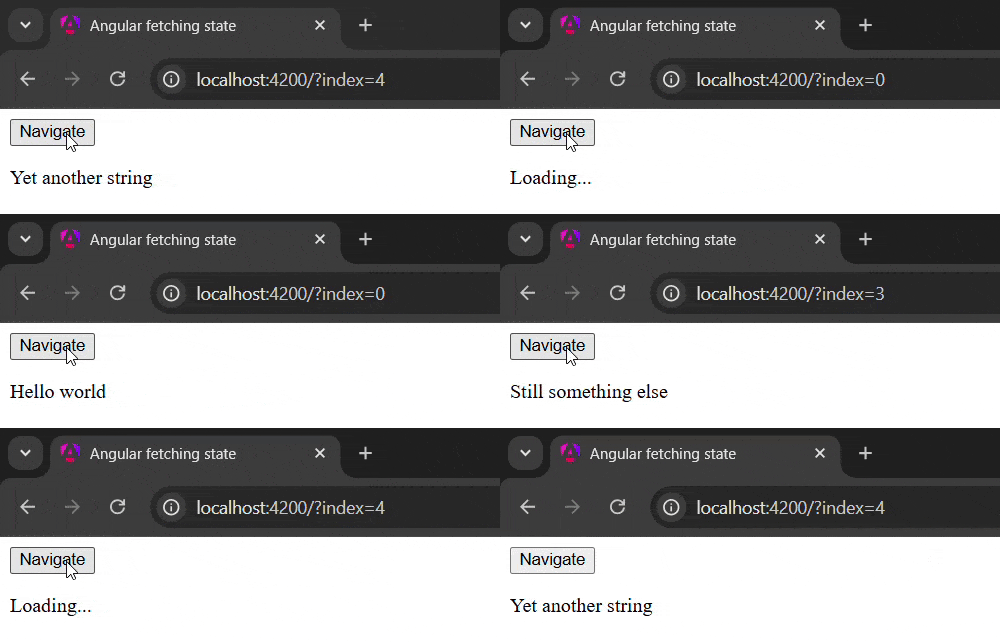
Please note that
paramsObswon't emit new values, if theindexquery param doesn't change, i.e. the same random index is sampled.Further improvements
